

Getting Started
A tour of the three surfaces you'll use — the Lab, the history sidebar, and the settings overlay — and the shape of a typical run.
Dr Moot is built around one idea: ask once, let several models work the answer over, then inspect the result before you trust it. Everything you need for that lives on a single screen.
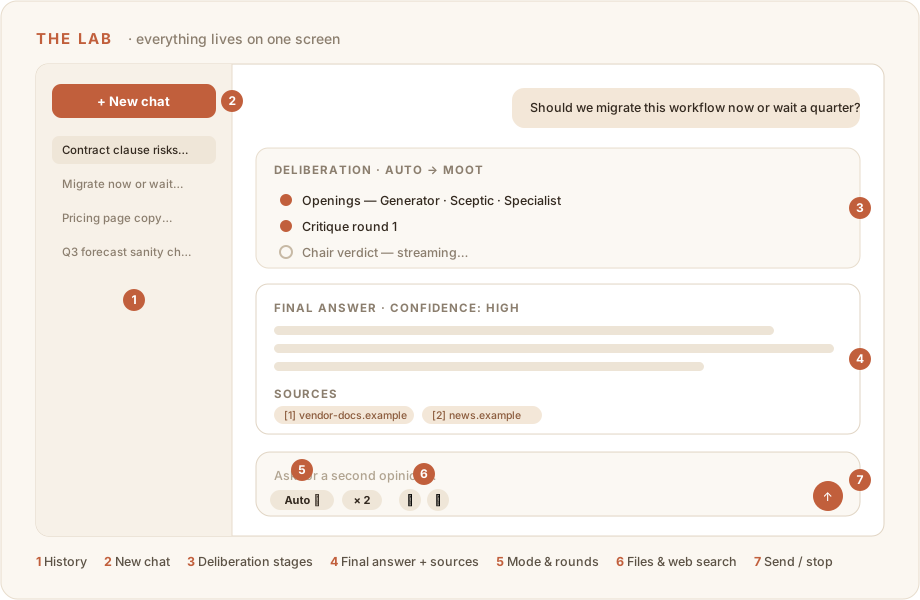
The Lab
The Lab is the main workspace. From top to bottom:
- Transcript — your prompts and the panel's work. Each assistant turn shows the deliberation stages first (openings, critiques, verdicts) and the final answer beneath them. Steps stream live as the models write.
- Composer — type your prompt here. The toolbar around it holds every run control:
- Mode picker — Relay, Debate, Moot, or Auto (the default). See Modes.
- Rounds — in Debate and Moot, choose 1–3 critique rounds.
- Paperclip — attach up to 5 files (PDF, DOCX, images, and more). See Attachments.
- Globe — toggle web search on when the answer depends on current information.
- Model pair — optionally override which models take part in this run.
- Send / Stop — the send button becomes a stop button while a run is streaming.
The history sidebar
Every conversation is saved automatically.
- Click any earlier conversation to reopen it — including its full deliberation record.
- New chat starts a clean conversation with no prior context.
- Delete conversations you no longer need directly from the sidebar.
If you refresh the page while a run is in flight, Dr Moot reattaches to the live run and catches you up — you don't lose the deliberation.
The settings overlay
Open Settings from your user menu (it's an overlay — you never leave the Lab).
- Account — profile, security, notification preferences, billing, plus your Dr Moot preferences: review style and personal model overrides.
- Organization — appears when you have an active organization: general settings, members, and organization billing.
- Administration — appears when your user role is
admin: user management, organizations, and the shared model configuration.
The full map is in Settings.
The shape of a typical run
- Start a new chat (or continue an old one if its context matters).
- Leave the mode on Auto, or pick one deliberately.
- Attach files or enable web search if the question needs them.
- Send a concrete prompt — decision, constraints, what a good answer optimizes for.
- Watch the panel deliberate; expand any stage to read the drafts and critiques.
- Read the final answer and the disagreement that produced it.
- Ask follow-ups in the same chat, or reset with a new one.
When Dr Moot is the right tool
Reach for Dr Moot when the cost of a wrong answer is higher than the cost of a slower one:
- decisions you're about to commit to,
- plans that need a strong counterargument before they ship,
- claims that should be checked against sources,
- anything where you'd normally ask a colleague to "poke holes in this."
For quick throwaway questions, a single-model chat is cheaper and faster — Dr Moot earns its keep when the answer matters.
Next
Walk through your first question — it takes about five minutes end to end.