

Your First Question
Run your first deliberation end to end — pick a mode, write a prompt worth deliberating, and read the result properly.
The fastest way to understand Dr Moot is to run one real question through it. Pick something you actually need a second opinion on — a decision, a plan, a piece of text you're unsure about.
1. Start a new chat
Open the Lab and click New chat in the sidebar. Each conversation carries its context forward, so a clean question deserves a clean chat.
2. Pick a mode (or don't)
The mode picker sits in the composer toolbar. Auto is the default and a good first choice: a router model reads your question and picks the right deliberation shape for it.
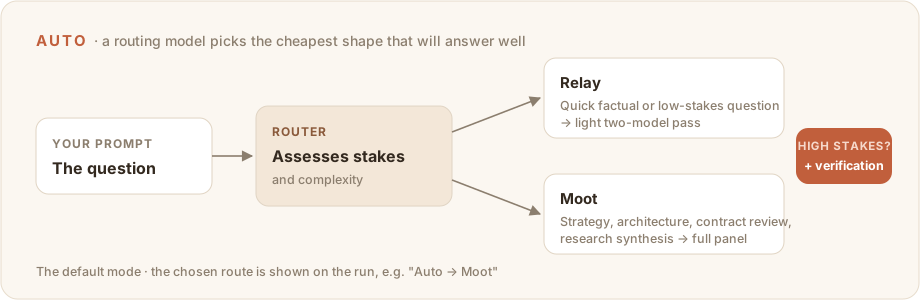
Choose manually when you already know what you want:
| You want | Pick |
|---|---|
| A fast second opinion on a draft or decision | Relay |
| Two models genuinely arguing opposite sides | Debate |
| The deepest review, with a chaired verdict | Moot |
Plan note
On the Light plan, runs use Relay regardless of what's requested — Debate and Moot are Pro features. Nothing errors; the run simply downgrades. See plans & limits.
3. Add context if the question needs it
- Paperclip — attach the document the question is about (up to 5 files, 10 MB each). Wait for uploads to finish before sending.
- Globe — turn on web search when the answer depends on anything that changed after the models' training data: prices, releases, news, live policy.
- Rounds — in Debate or Moot, raise rounds to 2–3 for contested questions. Start with 1 for anything simple.
4. Write a prompt worth deliberating
The panel can only argue about what you give it. Strong prompts state:
- the decision or problem,
- the constraints,
- what a good answer should optimize for,
- the output you want back.
I need to decide whether to migrate this workflow now or wait one quarter.
Compare the operational risk, product upside, and team cost.
Give me a recommendation and the strongest case against it.
Asking for "the strongest case against it" plays to Dr Moot's structure — the Sceptic seat exists to build exactly that.
5. Watch the deliberation
Steps stream live as models write. You'll see the stages fill in — openings, critiques, revisions, and (in Moot) the Chair's verdict. A few things worth knowing while it runs:
- The send button becomes Stop. Stopping keeps everything produced so far.
- Refreshing the page reattaches to the in-flight run — you won't lose it.
- In Auto, a badge shows the routing decision (e.g.
Auto → Moot).
6. Read the result in two layers
The final answer is what the panel wants you to act on. The deliberation above it is why you should — or shouldn't.
Before acting on an answer that matters:
- Read the Sceptic's critique (or Model B's, in Relay). Did the final answer actually address it?
- Check the confidence level on Moot verdicts —
High,Medium, orLow— and any dissent notes. Dissent means the panel didn't fully agree; slow down. - If web search ran, open the numbered sources and confirm they say what the answer claims.
7. Follow up or reset
- Stay in the same chat when the next question builds on this one — prior context carries forward.
- Start a new chat when you want the panel to come at a question fresh.
Next
- Modes — choose the deliberation shape on purpose.
- Results & history — everything a finished run can tell you.